How to Harden Linux Server Security: Audit First
Lynis audits and scores a Linux server's security but fixes nothing on its own. Here's how to harden Linux server security the right way.
Lynis is a command-line tool that scans a Linux, macOS, or BSD machine and hands back a punch list: dozens of specific weaknesses, each one ranked by how much it matters. It does not fix a single one of them. That gap, between finding a problem and deciding what to do about it, is where most advice on how to harden Linux server security quietly skips a step. Generic checklists get copied from server to server and applied top to bottom, whether or not they fit the machine running them. Lynis takes the opposite approach: it audits first, scores what it finds, and leaves the decision to the person who actually runs the box.
This walkthrough assumes sudo access to a Debian, Ubuntu, RHEL-family, or macOS/BSD machine. Run it on a test box or a disposable virtual machine first. A few of the fixes below touch SSH, the remote-login protocol most servers are managed through, and a wrong setting there can lock you out.
Install Lynis
Lynis is packaged in most distribution repositories, though usually a version or two behind the latest release. On Debian and Ubuntu:
sudo apt update
sudo apt install lynis
On Fedora, RHEL, and other Red Hat-family systems:
sudo dnf install lynisFor the current release, clone it straight from the source instead:
cd /usr/local
sudo git clone https://github.com/CISOfy/lynis
Michael Boelen started Lynis in 2007, and still develops it today through CISOfy, the Dutch company he founded in 2013. The core tool is free, open source, and licensed under the GPLv3. A separate paid add-on exists for managing audits across many servers from one dashboard, but everything in this guide works with the free command-line version alone.
Run your first audit
Once installed, the entire audit is one command:
sudo lynis audit systemIt works through the machine section by section: the boot loader, how logins are authenticated, file and directory permissions, installed packages, network settings, the firewall, SSH configuration, and logging, among others. A full run takes a minute or two on a typical server. Everything Lynis finds prints to the terminal as it goes, tagged as an observation, a warning, or a suggestion. The same detail gets written to two files for later reference: /var/log/lynis.log for the raw test-by-test log, and /var/log/lynis-report.dat for the structured results a script or a later comparison can read back.
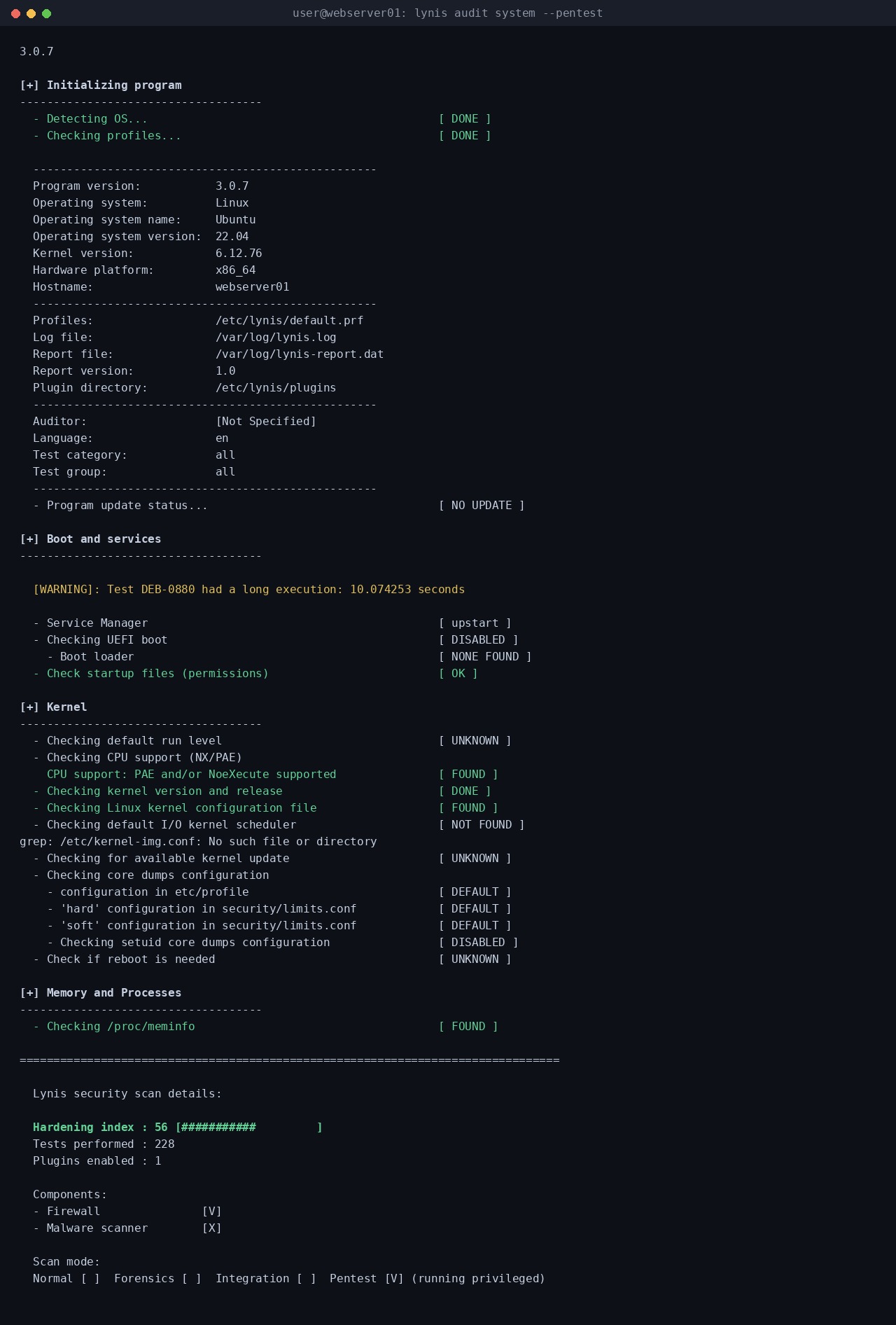
Root access is not strictly required. A --pentest flag runs a non-privileged scan that skips any test needing root permissions:
lynis audit system --pentestThat mode is not a substitute for the full audit. Whole categories go unchecked, so the resulting score reads lower and means less. What it is good for is a fast first look at a machine before you have elevated access to it, or a quick outside check by someone who should not have sudo on that box in the first place.
Read the hardening index without chasing the number
The audit ends with a hardening index, a score from 0 to 100 meant to summarize how many recommended measures are in place. In practice, a fresh, unconfigured install commonly lands somewhere in the 50s or 60s, and a server that has been through a deliberate hardening pass can push into the 80s or higher.
Boelen, who still writes about the tool on his own site, is blunt about what the number is not: the hardening index is just an indicator of measures taken, not a percentage of how safe the system actually is. He also warns against the obvious shortcut, disabling or skipping the tests a system keeps failing just to watch the score climb. That raises the number without touching the actual risk, and it makes comparing the result against another machine meaningless.
The useful reading of the score is relative, not absolute. Does this server look better hardened than it did last month, and does the gap between it and a similar server in the same fleet make sense.
Fix the two changes that matter most first
A first Lynis run on an average server can return over fifty suggestions. Trying to work through all of them in one sitting is how most audits end: someone opens the list, fixes three items, and never comes back to it. Two changes, both flagged on nearly every default install, are worth doing before anything else on the list.
The first is SSH password authentication. If key-based login already works, confirm that in a second terminal session before closing the first one, then turn off password login entirely:
sudo sed -i 's/#\?PasswordAuthentication .*/PasswordAuthentication no/' /etc/ssh/sshd_config
sudo systemctl restart sshd
This removes an entire category of password-guessing attacks against SSH, usually the single most frequently probed service on any internet-facing server. It is also the same instinct behind zero trust design: stop granting access by default and require proof instead.
The second is Fail2Ban, a daemon that watches log files such as /var/log/auth.log and temporarily blocks any IP address that racks up too many failed login attempts:
sudo apt install fail2ban
sudo systemctl enable --now fail2ban
Fail2Ban’s own documentation is careful about what this buys: it reduces the rate of break-in attempts, but it cannot fix weak authentication on its own, which is exactly why it belongs alongside the SSH change above, not instead of it.
Automate the re-audit and track the trend
A one-time audit is a snapshot. Lynis is meant to run repeatedly, and it has a flag built for that:
sudo lynis audit system --cronjobThe --cronjob flag runs the scan without interactive prompts, which makes it safe to drop into a scheduled job:
# /etc/cron.weekly/lynis-audit
#!/bin/sh
lynis audit system --cronjob
Each run overwrites the same /var/log/lynis-report.dat file, so keep a dated copy after each scan if the goal is a real trend line rather than just the latest snapshot. Comparing two reports side by side shows which suggestions got resolved and which new ones showed up since the last pass, a more concrete signal than the index number alone.
Confirming a single fix does not require a full re-run. The --tests-from-category flag narrows a scan to one area:
sudo lynis show categories
sudo lynis audit system --tests-from-category <category-name>
Running the categories listing once shows the exact names Lynis recognizes on that install. A narrow rerun straight after the SSH change above finishes in seconds instead of the full minute-plus scan, which makes it realistic to check a fix immediately rather than waiting for the next scheduled audit.
Test before you touch production
Every change suggested above, disabling SSH passwords, restarting a daemon, tightening a firewall rule, can also break something that depends on the current, looser configuration: a monitoring agent that still authenticates with a password, a cron job that assumes a port stays open. Apply Lynis suggestions on a staging copy of the server first, or at minimum keep a second, working session open while restarting SSH, so a mistake does not lock out the only way in.
Frequently asked questions
Is it safe to run Lynis on a production server?
Yes. A standard lynis audit system run only reads configuration and log files. It does not change anything on the machine by default, so running it on a live server carries no more risk than any other read-only inspection tool.
Does Lynis fix the problems it finds?
No, and that is deliberate. Lynis produces a scored list of suggestions with links to documentation and, for many items, the exact command to fix them, but applying any of it is a manual decision. The paid Lynis Enterprise product adds central reporting across servers, not automatic remediation.
What counts as a good hardening index score?
There is no universal passing grade. The number is useful for tracking one server’s progress over time, or for spotting a server in a fleet that lags noticeably behind its peers. Treating any fixed number as a pass or fail target misses the point of the tool, according to its own creator.
Is Lynis the same as CIS-CAT or OpenSCAP?
No. CIS-CAT is the Center for Internet Security’s own scanner for its published benchmarks, and OpenSCAP is a separate open standard and toolset backed by Red Hat. Lynis is an independent project that references CIS benchmarks, NIST, and vendor guides as background material, but it is not built or certified by any of those organizations.
The takeaway for anyone running a Linux server
Lynis will not harden a server by itself, and that is the entire point of it. A tool that quietly auto-applied every recommended setting would eventually break something important, on a machine nobody was watching closely enough to notice. What it actually does is turn “harden the server” from a vague instruction into a short, ranked, specific list, then get out of the way. Start with SSH and Fail2Ban, re-run the audit on a schedule, and let the score track progress instead of defining it. That is a more honest way to harden Linux server security than working through someone else’s checklist top to bottom.