The Vibe Coding Security Checklist That Actually Matters
AI coding agents secure most of an app by default. This vibe coding security checklist targets the spots where the agent left the framework's safe path.

A developer asks an AI coding agent, something like Claude Code, to build a small booking app in an afternoon: describing what the app should do in plain English and letting the agent write the actual code, a practice now widely called vibe coding. Security is rarely mentioned in that request, yet the agent picks a mainstream web framework, wires up a database, adds a login form, and ships a working product before lunch. Most of the classic security mistakes that used to plague hand-written code never show up, because the framework handles them automatically: it escapes text before displaying it, it builds database queries safely, it hashes passwords without being asked. The risk in that app is not spread evenly across the codebase. It concentrates in the handful of places where the agent, following the developer’s instructions or its own shortcuts, stepped outside the framework’s normal way of doing things.
That is the real shape of the problem with AI-generated applications going live, distinct from the usual warning that AI writes insecure code. A practical vibe coding security checklist skips the memorized list of vulnerabilities; instead it offers a method for finding the specific spots where an agent left the paved road, because those spots are where the actual damage happens.
Where the secrets actually leak
The most common way a vibe-coded app gets compromised has nothing to do with clever exploits. It is a password, an API key, or a database credential typed directly into the code instead of stored somewhere separate and protected, then pushed to a public code repository without anyone noticing.
This is a documented pattern, not a guess. The security firm GitGuardian tracks secrets exposure across public GitHub every year, and its State of Secrets Sprawl 2026 report found that 28.65 million secrets, meaning credentials, tokens, and keys, were added to public GitHub commits in 2025, a 34% jump over the previous year and the largest annual increase the company has recorded. More telling for this specific topic, commits made with the help of Claude Code, one of the more widely used AI coding agents, carried a secret-leak rate of 3.2%, compared with a 1.5% average across all public GitHub commits, roughly double. Secrets tied specifically to AI services were up 81% over the year.
A leaked credential like this is also a common entry point for software supply chain attacks, where one exposed key opens the door to far more than the original app. None of this means the agents are careless by design. It means that when the instruction is simply to make it work quickly, the fastest path is often to paste a real key into a configuration file rather than set up a proper secrets manager, and the agent, optimizing for a working demo, will take that path unless told otherwise. The fix costs nothing: keep credentials in environment variables or a dedicated secrets store, never in code, and check any repository before making it public.

Injection flaws show up exactly where the framework got bypassed
SQL injection, a technique where an attacker slips their own database commands into a form field or search box because the app builds its database queries by directly stitching together text, remains one of the most damaging and most preventable bugs in web applications. It ranks third on the CWE Top 25 Most Dangerous Software Weaknesses, the annual list MITRE and the US Cybersecurity and Infrastructure Security Agency compile from roughly 31,770 real-world vulnerability reports.
Modern frameworks solve this by default through what is called a query builder, a layer of code that assembles database requests safely, treating user input as data rather than as commands, without the developer having to think about it. A coding agent working inside a mainstream framework will normally use that query builder automatically. The failure case is narrow but predictable: someone requests a custom search feature or a performance tweak, and the agent, trying to satisfy the request, writes a raw SQL query by hand instead of going through the builder. That single hand-rolled query is where an attacker gets in.
The difference is visible in the code itself. The paved path looks like this, in a typical Node.js application:
// The framework's query builder treats orderId as data, never as a command
const order = await db("orders").where({ id: orderId, userId: currentUser.id }).first();
The bypass looks like this:
// A hand-written query splices orderId directly into the SQL text
const order = await db.raw(`SELECT * FROM orders WHERE id = ${orderId}`);
Both return the same order on a normal request. Only the second one lets an attacker type database commands into the orderId field itself.
The same pattern applies to how a page displays content submitted by users, such as a comment or a profile bio. Frameworks automatically escape that text, meaning they convert it into plain, inert characters before showing it on a page, so that a comment containing a snippet of code just displays as harmless text instead of running. The moment the request is to “render this as HTML” for some formatting feature, that automatic escaping gets turned off, and any visitor who can submit text can potentially plant code that runs in another user’s browser.
Auditing for injection flaws means searching a codebase for the exceptions, not the rule: any raw query construction, any explicit HTML rendering flag, any place where a comment in the code says something like “had to do this manually.” Those lines deserve a second look precisely because they are rare.
Access control gaps: who can see whose data
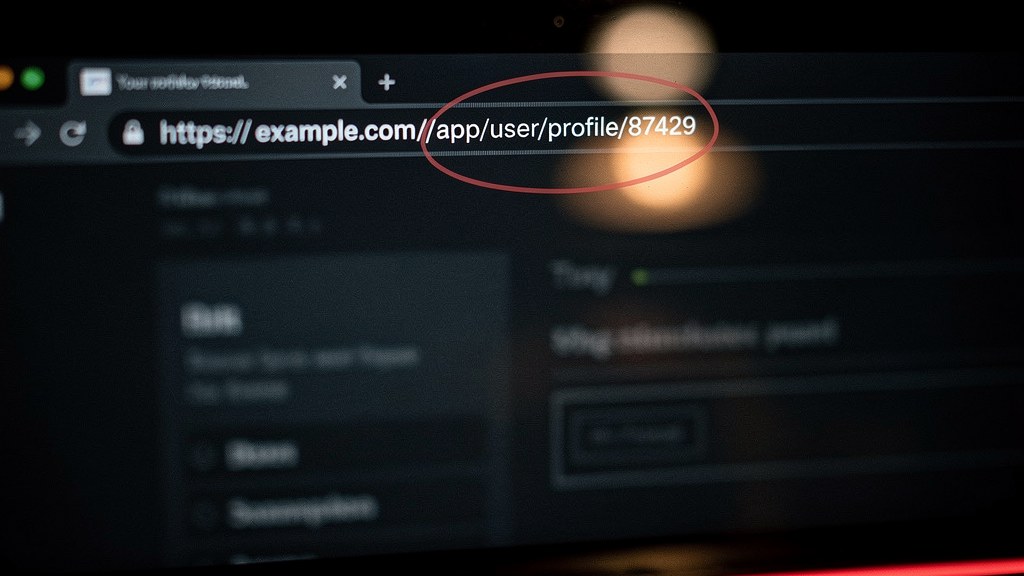
A subtler and, in practice, more common problem is when the app correctly checks that a visitor is logged in, but fails to check that the specific piece of data they are requesting actually belongs to them. This flaw is formally named Broken Object Level Authorization by the OWASP API Security Top 10, where it holds the number one spot, commonly known by the shorthand IDOR, for insecure direct object reference: a case where changing a number in a web address, such as an order or invoice ID, lets someone view or edit a record that is not theirs. It is exactly the kind of default suspicion that Zero Trust security argues for: checking every single request on its own, rather than assuming that a logged-in session already proves the visitor should see this particular record.
This gap tends to appear when an AI agent builds a feature quickly by copying the shape of an existing one. It gets the login check right because that pattern is everywhere in the codebase and in its training, but the ownership check is easy to skip because it depends on the specific business logic of that one feature, confirming that the order ID in the request actually belongs to the logged-in user. It has to be written intentionally for each sensitive action; a framework cannot invent it on its own the way it can invent safe database queries.
A related, older issue is CSRF, or cross-site request forgery, where a malicious website tricks a visitor’s browser into submitting an action, like changing an email address or making a purchase, on a site the visitor happens to be logged into elsewhere, without the visitor knowing. CSRF ranks fourth on the same CWE Top 25 list cited above. Most modern frameworks include built-in protection against it, typically a hidden token that must match on every form submission, active by default. It stops mattering only when a developer disables that protection to make an API easier to call from another program, which is a deliberate trade-off worth revisiting before launch rather than a bug.
The item that did not exist five years ago: prompt injection
Every flaw so far predates AI coding agents. Prompt injection is different: it targets apps that themselves use an AI model as a feature, for example a customer support chatbot embedded in the product, and it does not exploit a coding mistake so much as a structural weakness in how these models work. An attacker hides instructions inside content the AI model will read, such as a document it is asked to summarize or a message it is asked to respond to, and the model, unable to reliably tell the difference between the developer’s original instructions and text it is merely processing, follows the hidden ones instead.
The OWASP Top 10 for Large Language Model Applications lists prompt injection as LLM01, the top entry, for the second edition in a row. It sits alongside similar catalogs from MITRE and the US government’s NIST, compared in detail elsewhere, all trying to name AI-specific risks that classic security checklists never had to cover. That ranking matters here for a specific reason: it is the one item on this list that a framework’s safe defaults cannot quietly handle, because there is no equivalent of a query builder for it yet. If the app being reviewed includes any AI-powered feature beyond the coding process itself, that feature needs a deliberate check that was not automatically supplied.
How to actually audit an AI-generated app before it goes live
Running through a checklist item by item and confirming each box invites false confidence, because a box can be technically true (the app “has” authentication, “has” input validation) while still hiding the one exception that matters. The more useful method is to go looking for the exceptions themselves.
Start by searching the codebase for anywhere a raw database query was written instead of using the framework’s standard query methods, and for any place where content is rendered as HTML directly instead of through the framework’s normal, automatically escaped output. Both are usually rare enough to review individually in a small to medium app, and both tend to appear in comments or code the agent added after a specific, unusual request. Next, look at every feature that lets a logged-in user act on a specific record, an order, a document, a message, and confirm there is an explicit line of code checking that the record belongs to that user, not just that the user is logged in at all. Then check whether the framework’s CSRF protection was left on, and if it was turned off anywhere, whether that was a deliberate, documented choice. Finally, if the app has any AI-powered feature of its own, confirm that untrusted text it processes, uploaded documents, scraped web pages, messages from strangers, cannot silently override its instructions.

This approach scales down to a solo developer reviewing their own weekend project and up to a team preparing to launch a paid product, because it does not require reading every line of an AI-generated codebase. It requires knowing which handful of lines to distrust.

Frequently asked questions
Does using an AI coding agent make an application less secure than one written by a human developer?
Not inherently. A vibe coding security checklist exists because AI-generated code follows the same security patterns as the framework it is built on, which is often safer than average hand-written code, except in the small number of places where a developer’s request pushed the agent to bypass those defaults, and those spots deserve extra scrutiny.
What is the single highest-priority item to check before launching an AI-generated app?
Exposed secrets, meaning passwords, API keys, or database credentials committed directly into code, are the most common and cheapest-to-fix problem. GitGuardian’s 2026 report found leak rates roughly double the public average in commits made with AI coding assistance, and the fix, moving credentials into environment variables, takes minutes.
What is IDOR and why does an AI agent tend to miss it?
IDOR, short for insecure direct object reference, happens when an app lets a logged-in user access another user’s data simply by changing an identifier, like an order number, in a request. Coding agents tend to correctly add login checks, which are a common pattern, but skip the ownership check for a specific record, which depends on business logic unique to each feature.
Is prompt injection relevant to an app that does not have a chatbot?
Prompt injection, ranked LLM01 by the OWASP Top 10 for LLM Applications, only applies to features where the application itself feeds untrusted text into an AI model as part of its own logic. An app with no AI-powered feature beyond the coding process that built it is not exposed to this particular risk.
How long does a security review like this take for a small AI-generated app?
For a small to medium application, searching the codebase for hand-written database queries, unescaped HTML rendering, missing ownership checks, and disabled CSRF protection typically takes a few hours, not days, because the review targets specific, identifiable exceptions rather than the entire codebase.