Zero Trust, Explained: Why a Network Should Trust No One by Default
Zero Trust drops the old idea that anyone inside the network is safe. What it really means, why it caught on, and where to start.

For years, company security worked like a guarded building. You proved who you were once, on the way in, and after that the inside was yours: the files, the apps, the other people’s screens. Zero Trust is the security idea that throws that arrangement out and checks every request on its own, every time, no matter who is asking or where they are. Being on the office Wi-Fi earns you nothing. Connecting through the company’s remote access earns you nothing. Each time you reach for something, the system asks again whether you should have it.
The phrase has a clear origin. A security analyst named John Kindervag, then at the research firm Forrester, laid it out in 2010 and boiled it down to four words: never trust, always verify. The tooling took most of the following decade to catch up, and in 2020 the US standards agency NIST published a formal blueprint for it, which is roughly when the idea went from contrarian to mainstream. This is what it actually means for the way your access works, and where a sane rollout starts.
Why the old “trust the inside” model broke
The guarded-building approach made sense when everyone really was in the building. Staff sat at office desks, the apps ran on machines in a back room down the hall, and you spent your security budget hardening the one entrance. Whatever made it inside got trusted by default.

Almost no company looks like that anymore. The “inside” it was built to protect has quietly dissolved. A normal setup today is scattered: people working from home on their own laptops, apps rented from outside providers that never touch the company’s own machines, work running on rented computing power from a handful of cloud companies, smart devices with weak security plugged into the same network, and outside vendors handed a slice of access to do their job.
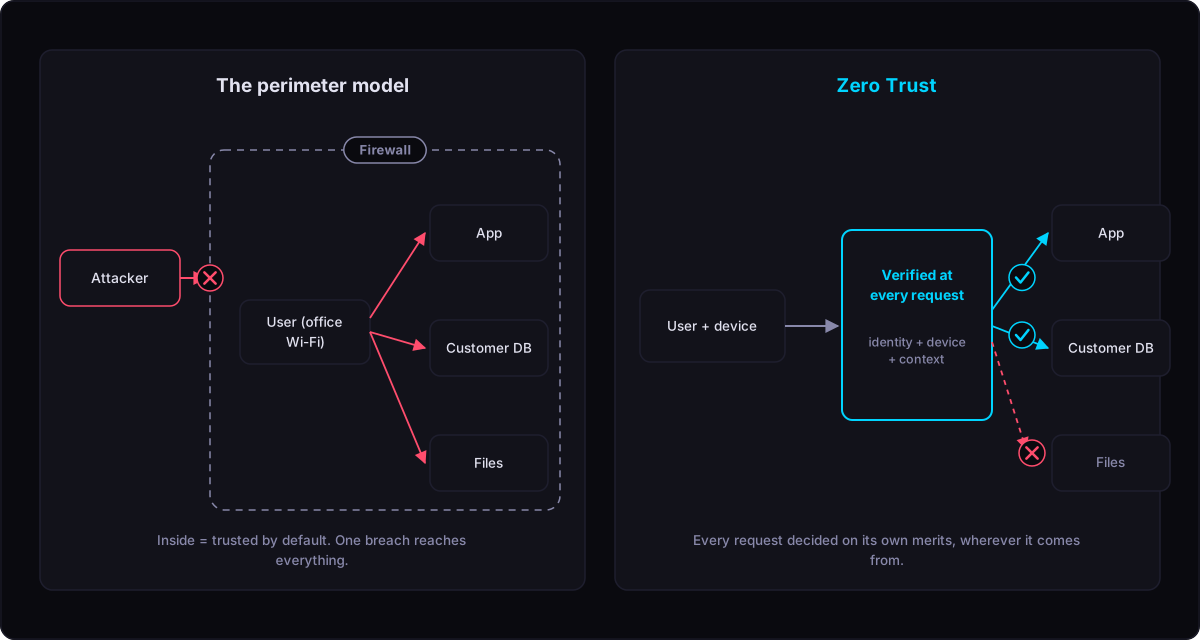
Once your people, your apps, and your data live all over the place, there is no clean “inside” left to wall off. A remote connection does not make a laptop trustworthy, and sitting on the office network should not, by itself, open the customer database. Zero Trust answers this by moving the check to the only place that still makes sense: the moment of each request, judged on who is asking, what they are asking from, and whether anything looks off right now.
The one rule, in three parts
Strip away the vocabulary and Zero Trust is a single instinct: assume an intruder could already be inside, and never let “they’re already in” be a reason to say yes. That instinct shows up as three working rules.
Check every time, against everything you know. A login is not a hall pass for the rest of the day. Each request is weighed against who the user is, whether their device looks healthy, where they are, and how risky the action is. A password alone is thin proof, so a second check is added: a tap on your phone, a code, a physical key. The system tightens automatically when something looks wrong and stays quiet when it doesn’t, so people aren’t nagged for every routine click.
Give the least access that does the job. Hand each person and each system only what they need, and only for as long as they need it. Someone who needs a folder for an afternoon gets it for an afternoon, not forever. Broad, permanent access is the thing attackers hunt for, because one stolen account then opens everything.
Build as if someone is already in. Plan for the break-in instead of only trying to prevent it. That means keeping any single compromise small: splitting the network so an intruder can’t wander freely, scrambling data as it moves so a snooper sees nothing useful, and watching closely enough to spot a foothold before it spreads. This is exactly the discipline that contains self-propagating supply chain attacks, where one hijacked account tries to reach everything it can touch.
What it’s actually made of
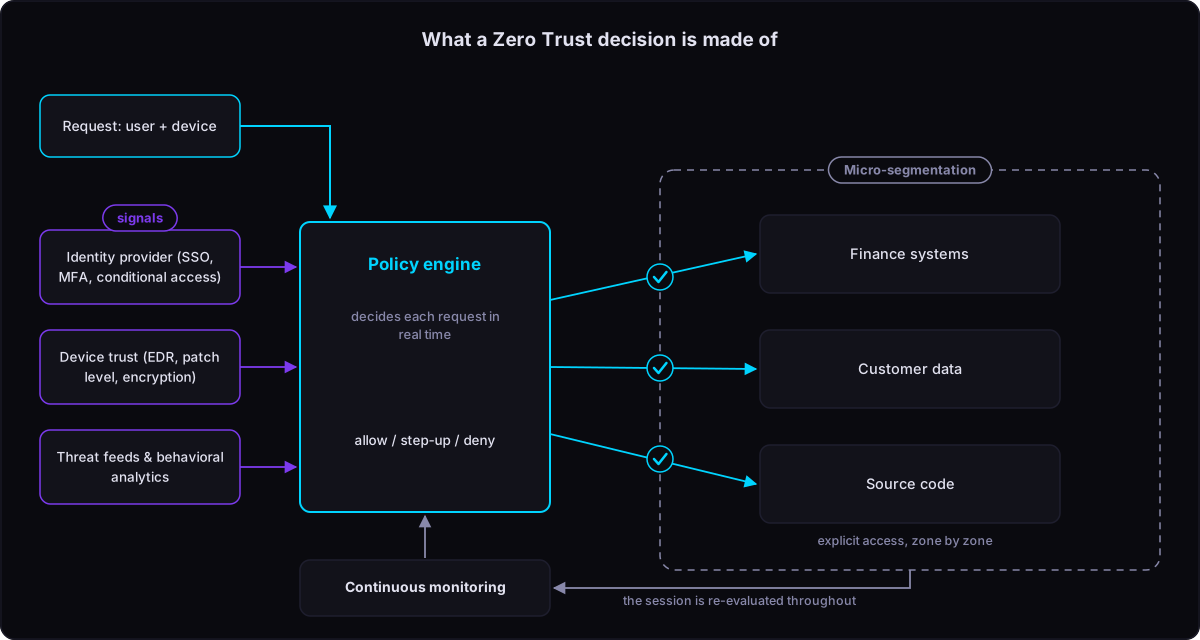
In practice Zero Trust is a few pieces feeding each other information. The names vary by vendor, but the jobs don’t.
The identity check is the foundation: the service that confirms who someone is and hands out access. A good one lets people sign in once for everything, demands that stronger second proof, and pays special attention to powerful admin accounts that can do the most damage if stolen.
The device check asks a simple question before granting anything: can this laptop or phone be trusted right now? Is it company-managed, kept up to date, running its security software, with its storage scrambled? A healthy user on a sick device is still a risk, so the device’s condition feeds straight into the decision.
Network splitting breaks one big open network into many small, walled-off sections, each with its own rules. On a flat network, one infected machine can reach every other machine. Split it, and moving from one section to the next needs fresh permission, which is what stops a single break-in from becoming a tour of the whole company.
The decision engine is where it all comes together. It reads the signals from the identity check, the device check, and any warnings about current threats, then approves or denies each request in real time. The catch worth remembering: a decision is only as good as the signals behind it. An engine with nothing reliable to read just waves everything through, which is why identity and device checks come first.
Continuous watching keeps the verdict alive after the door opens. If someone’s risk jumps mid-session, say their device suddenly shows signs of trouble, the connection can be cut or bumped up to an extra check on the spot.
Where a sane rollout starts
Zero Trust is not a switch you flip. It is a sequence, and the order matters more than the speed. The durable lesson is to start with identity and grow outward, never to do everything at once.
You begin with identity, because it pays off fastest and feeds everything after it. Get everyone signing in through one solid system with that second proof of identity, block devices that don’t meet the bar, and lock down admin accounts. This step alone wipes out a whole class of attacks built on stolen or guessed passwords.
Then devices: put the health checks in place and wire them into who gets to reach what, starting with your most sensitive systems and widening as coverage grows. Then network splitting, sealing off your crown-jewel systems first, after you’ve mapped how traffic actually flows, or you’ll lock out legitimate work and leave real gaps. Then data, labeling what’s sensitive so the protection travels with the file itself, even into outside apps you don’t fully control. And then you keep tuning, testing your own defenses on purpose to find the gaps where they really are rather than where you assume they are.
The exact pace is yours. What doesn’t change is the direction: identity first, data last, each step generating the signals that make the next one easier.
The mistakes that sink it

A handful of patterns show up in nearly every stalled effort.
Trying to do it all at once. This is a multi-year shift, not a quarter’s project. Starting everywhere means finishing nowhere.
Making it miserable to use. Controls that annoy people get quietly worked around, which defeats the point. The fix is to challenge people only when something actually looks risky, so the everyday path stays smooth.
Buying a box instead of building the habit. No vendor sells Zero Trust ready-made, whatever the sales pitch promised. The tools are real, but they don’t add up to Zero Trust without clear rules, named owners, and someone acting on the warnings the system raises.
Forgetting the old systems. Plenty of older apps can’t speak the modern login language. The move is to tuck them behind a gatekeeper or wall them off, not to carve out a permanent exception that quietly undoes the whole model.
Where to start
Zero Trust pays off in steps, not all at once. Get identity solid, build trust in your devices, wall off what matters most, protect your data, then keep refining. Every step shrinks the ground an attacker can cover, and the signals each one produces make the next one easier. If you want a deeper foundational read, the SOS Ransomware team has a detailed walkthrough of Zero Trust as a security architecture. Most efforts that stall trace back to unclear ownership and rules nobody enforces, not to the technology itself.
Frequently asked questions
Is Zero Trust a product I can buy?
No, and that’s the most common misunderstanding. It’s an approach, not a purchase. Real products help you build it, the identity system, the device checks, the network splitting, but the approach itself is made of policies and decisions about who gets access to what. A company can own every tool on the market and still not have Zero Trust if nobody set the rules or watches the alerts.
Does Zero Trust mean getting rid of remote access tools like VPNs?
Often, eventually, but not as the first move. The deeper issue is the assumption behind older remote access: that once you’re “connected,” you’re trusted. Zero Trust drops that assumption and checks each request regardless of how you connected. Some setups keep a remote tunnel and layer per-request checks on top; others replace it entirely. The principle is what matters, not the specific tool.
Won’t all this checking drive people crazy?
It doesn’t have to, and a rollout that ignores this fails. The point of risk-based checks is that the system stays quiet during normal, low-risk activity and only asks for more proof when something looks unusual, an odd location, a new device, a sensitive action. Done well, most people notice less friction than before, not more, because the routine path gets smoother while the suspicious path gets harder.
Is Zero Trust only for big companies?
The label and the budgets came from large enterprises, but the core idea scales down cleanly. A small company that makes everyone use a single strong sign-in, with a second proof of identity, and limits who can reach sensitive files has already done the highest-value part. You don’t need the full architecture to capture most of the benefit.
Where should a team actually start?
Identity, every time. Get everyone signing in through one trusted system with a second proof beyond the password, and lock down the powerful admin accounts. It’s the step that blocks the largest share of real attacks, and it produces the information every later step depends on.
Photo: Fernando Narvaez / Pexels