Google's Selfie Video Account Recovery: The Setting to Watch
Google now lets you record a selfie video to recover a locked account. How it works, how safe it really is, and the one setting worth checking.
Getting locked out of your main account is one of those quiet disasters. No password, no phone in reach, no backup code, and no friend set up as a recovery contact, and suddenly your email, your photos, and half your other logins sit behind a door you cannot open. On July 23, 2026, Google announced a new backstop for exactly that moment. Google selfie video account recovery works like this: you record a short video of your face, the company stores it, and if you are ever locked out you record another one so the system can check that the two match. Losing that access, or having it stolen by attackers who patiently study their target, is the kind of problem it is built to soften.
How Google’s selfie recovery actually works
Setting it up takes about a minute. You look into your device’s camera and follow a few short, guided head movements so it can capture your face from several angles. Google saves that video, encrypted, and links it to your account. You start the process from a dedicated page, g.co/signin-selfie, and the whole thing is opt-in.
The recovery moment runs in reverse. When you are locked out and Google needs to be sure it is really you, you record a fresh selfie video and perform a few simple movements to prove there is a live person in front of the camera and not a photo or a screen. Google then compares the new video to the one you saved to confirm it is the same face.
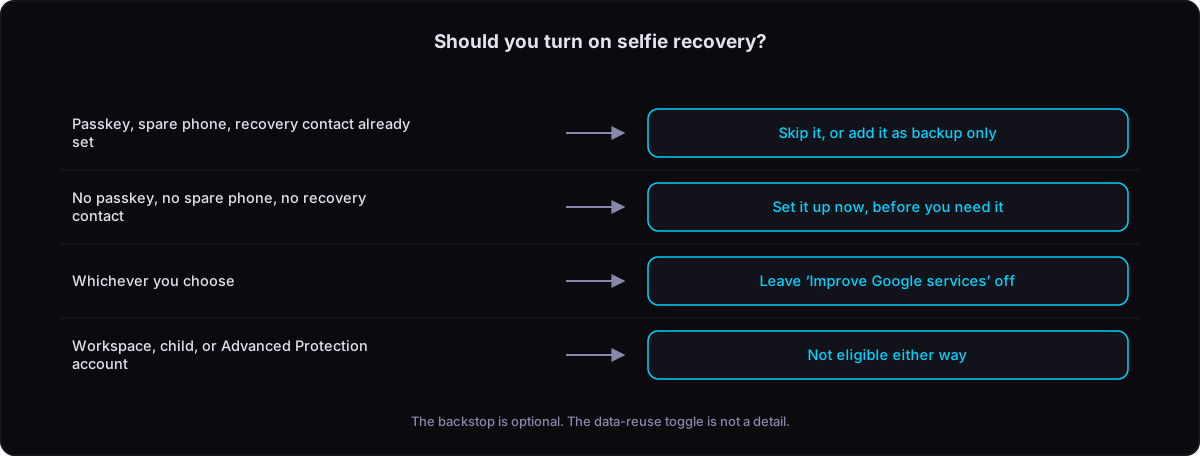
This is a last resort you reach for only when everything else has failed, no password, no passkey (the newer passwordless sign-in), no phone to tap, no recovery contact to vouch for you. You will not open it on an ordinary day; it waits in the background for the worst case. It also does not apply to everyone. Google has left out Workspace accounts (the business and school kind), children’s accounts, and anyone in its Advanced Protection Program, the high-security tier for people at elevated risk of being targeted.
Why this is not the face unlock you already know
Most people have met face recognition through Apple’s Face ID or Windows Hello, where you glance at a phone or laptop and it opens. Those systems use a dedicated infrared camera that measures the depth of your face, building a rough 3D model of it. That physical measurement is hard to fake, because a flat photo or a video playing on a screen has no real depth to copy.
Google’s selfie recovery does not have that hardware to lean on. It works with ordinary flat video from a normal camera, plus artificial intelligence that judges whether the footage is live. The guided head movements are how it tries to tell a real person apart from a still image or a replayed clip. The side-to-side turn is doing real work: it forces your profile into view, and today’s real-time deepfakes, trained mostly on a head-on face, tend to break down the moment the head swings to the side. That is a real hurdle for an attacker to clear. It still is not the same as depth-sensing, though. As The Register described it, the approach rests on plain video, AI, and the hope that deepfakes have not yet become good enough. The weakness here is one of hardware, not just software.
Google is not blind to this. It says it built in protections aimed squarely at fake photos and videos, meaning deepfakes, and it folds the selfie check into the systems it already runs to spot suspicious sign-ins. Google also allows for situations where a selfie video on its own will not be enough to let you back in, with other signals weighed before the door opens. Treating a single face video as absolute proof of identity would run against a basic security principle, that no one factor should be trusted on its own, which is the idea at the heart of a zero trust approach to access.
The setting that decides what your face is used for
By default, your selfie video is used only to help you sign in, and nothing more.
There is, however, a separate switch in your account settings, labelled “Improve Google services (optional)”, and it changes the deal. Turn it on, and the same face video can also help Google train its other systems, including facial recognition and age estimation. It stays off unless you choose to enable it, and it is a distinct decision from setting up recovery in the first place.
That separation is the detail that actually matters for you. Handing Google a video so you can rescue a locked account is a narrow, practical trade. Feeding your face into the training data for Google’s future recognition and age-guessing models is a much broader one. Google keeps the two apart on purpose, which means you can take the useful part, the recovery backstop, without signing up for the second. One practical point remains: the only way to get this right is to look at the toggle yourself rather than accept a default you never opened.
What you actually keep control of
The control side reads better than the hardware side. You can delete the selfie video at any time from your Google Account. By default, Google says it will remove the video on its own after a period even if you do nothing. The video stays encrypted while it sits unused, so it is protected in storage. The one caveat to keep in mind: if you break a Google policy, the company may hold the video longer than the normal window.
Where things turn vague is availability. Google describes the feature as not available for all regions, accounts, or devices, and it has not published a list of which countries get it first. That is Google’s own fuzziness rather than a detail someone is hiding, so it is worth checking whether the option even shows up in your settings before you count on it. In practice you need a mobile device with a camera and a WiFi connection to set it up, and if your computer has no camera, you can complete the check using your phone instead.
The takeaway
Google’s selfie video account recovery is a sensible answer to a real problem, fenced more carefully than the flat reading “Google now has my face” suggests: opt-in, encrypted, deletable, and walled off from the account types that need stronger protection. Its real weakness is physical, a plain camera doing a job that dedicated depth-sensing hardware does better. The thing genuinely worth two minutes of your time sits in the settings, though: the “Improve Google services” toggle that decides whether your face becomes training data. Set up the backstop if it is useful to you, then go and check that one switch on purpose.
Frequently asked questions
Do I have to turn this on?
No. It is entirely opt-in and sits quietly in the background as a recovery option. If you already have a passkey, a recovery phone, and a recovery contact in place, you may never need it. It exists for the day all of those are out of reach at once.
Is it as secure as Face ID?
Not in the same way. Face ID and Windows Hello use a special depth-sensing camera that is genuinely hard to fool. Google’s version relies on a standard camera plus AI checks that the footage is live, which is a weaker physical safeguard. Google offsets this by treating the selfie as one signal among several rather than a lone key, and by allowing for cases where it is not sufficient on its own.
Will Google use my face to train its AI?
Only if you switch on the separate “Improve Google services (optional)” setting. Left alone, the video is used solely to sign you back in. This is the single setting worth checking after you set the feature up.
Can I delete my selfie video later?
Yes, at any time from your Google Account. Google also says it deletes the video automatically after a period by default. The exception is if you have violated a Google policy, in which case it may be kept longer.
Is it available where I live?
Possibly not yet. Google has said the feature will not reach every region, account, or device at launch, and it has not named the countries in the first wave. The honest answer is to check your own account settings and see.
Photo: www.kaboompics.com / Pexels